


Will Serlo replace my team?
No. Serlo handles routine conversations and intake so your team can focus on the work that needs people.
FOR RESIDENTIAL PROPERTY MANAGEMENT TEAMS
Serlo answers routine questions from the information you approve, turns maintenance issues into organized tasks, and flags possible emergencies, supporting your configured escalation procedures. Your team starts from organized requests, not voicemails.
REAL SERLO SCREEN · SMS
ILLUSTRATIVE RESIDENT DETAILS
THE TASK
Created from the conversation, with the property and unit attached
THE RESIDENT
A follow-up joins the same task, not a new one
SERLO
The resident knows what happens next
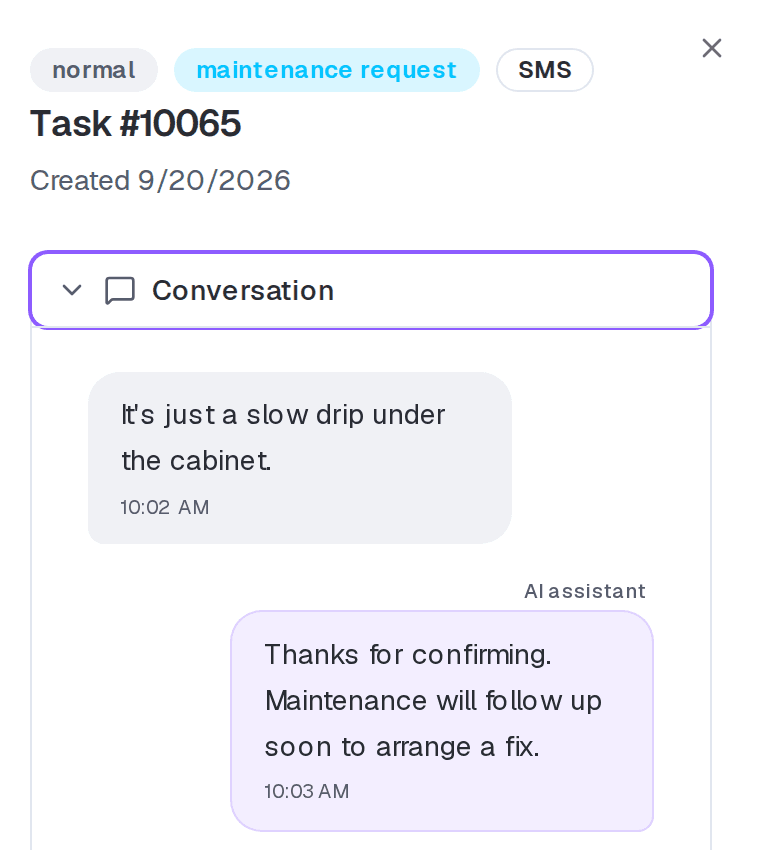
Task #10065, with the text conversation that created it.
REAL SERLO SCREEN · SMS
ILLUSTRATIVE RESIDENT DETAILS
THE TASK
Created from the conversation, with the property and unit attached
THE RESIDENT
A follow-up joins the same task, not a new one
SERLO
The resident knows what happens next
Task #10065, with the text conversation that created it.
PRODUCT FILM · 1:05
Real Serlo screens: a text becomes a task your team can act on, a routine question is answered from your property information, and a possible emergency follows your escalation procedures.
A one-minute look at Serlo. A resident texts about a kitchen sink leak. Serlo confirms the unit, asks whether the water is actively flowing, and creates a task with the details attached. A team member assigns it and sets it in progress, and the resident’s later check-in is added to the same task. Serlo answers a routine trash pickup question from the property’s knowledge base. On a phone call about an active leak, Serlo recognizes a possible emergency and, following the team’s escalation settings, connects the caller to the on-call contact with a warm transfer.
SERLO PRODUCT SCREENS · DEMO BUSINESS, FICTIONAL RESIDENTS · CALL AUDIO RECREATED FROM A VERIFIED SERLO CALL.
Request a DemoPOSSIBLE EMERGENCIES
You set your escalation procedures and who should be contacted.
01 · RECOGNIZE
Serlo checks resident conversations for signs of a possible emergency.
02 · ESCALATE
When enabled and configured, Serlo follows your escalation procedure, which can include a warm transfer to on-call staff during supported voice calls.
03 · FLAG
Requests identified as potential emergencies are flagged for your team's review.
04 · RECORD
The conversation stays attached to the task for follow-up.
WHAT YOU CONFIGURE
OPTIONALWarm transfer to on-call staff during supported voice calls
IMPORTANT
Emergency detection and escalation are not guaranteed. Escalation depends on your configuration, system availability, and on-call response. Serlo is not an emergency service. Residents in immediate danger should call 911.
HOW IT WORKS
Riley texts about a kitchen sink leak. Serlo confirms the location and the details stay linked to the task.
FULL TRANSCRIPT, VERBATIM
Riley · 9:59 AM
My kitchen sink is leaking.
Serlo · 10:00 AM
Just to confirm, is this issue at Unit 5A at Maple Court Apartments? Reply STOP to opt out. Reply HELP for help. Msg&data rates may apply. Your reference number for this issue is TASK10065.
Riley · 10:01 AM
That's right.
Serlo · 10:01 AM
Thank you. Is the water actively flowing now, or is it a slow drip?
Riley · 10:02 AM
It's just a slow drip under the cabinet.
Serlo · 10:03 AM
Thanks for confirming. Maintenance will follow up soon to arrange a fix.
TASK #10065 FIELDS, AS SHOWN IN SERLO
SERLO PRODUCT SCREENS · RESIDENT AND PROPERTY DETAILS ARE ILLUSTRATIVE.
CAPABILITIES
VOICE
Serlo answers resident calls, holds a natural conversation, and asks follow-up questions about the issue.
SMS
Residents can text Serlo instead of calling. Either way, maintenance requests become organized tasks for your team.
AFTER HOURS
Route resident calls to Serlo outside office hours. Routine requests are collected for follow-through; potentially urgent issues can follow your configured escalation procedures.
ROUTINE QUESTIONS
You configure property details, policies, and procedures. When a question falls outside what Serlo knows, it creates a task for your team instead of guessing.
EXAMPLES OF TOPICS YOU CAN CONFIGURE
THE TEAM SIDE
See what’s open, what’s urgent, and which property each request belongs to. Then assign it and mark it done.
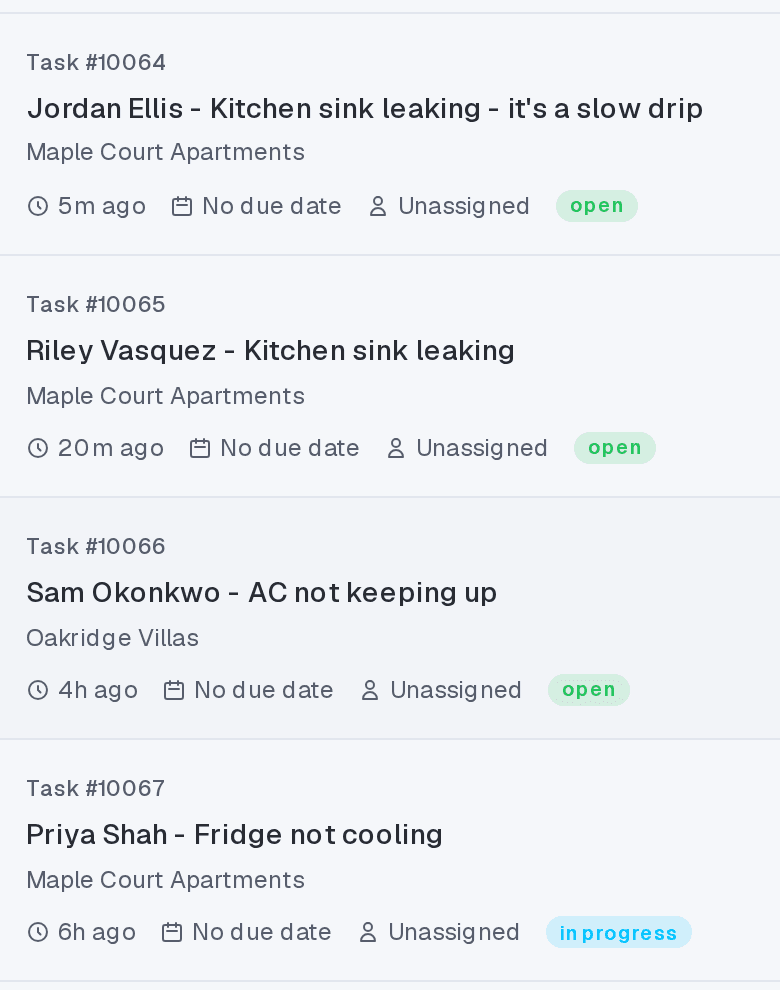
SERLO TASK WORKSPACE · ILLUSTRATIVE RESIDENT, PROPERTY, AND TASK DETAILS.
GETTING STARTED
Serlo works alongside your property management software. It doesn’t replace it.
Share your properties and procedures
Property details, the questions residents ask most, and how your team handles maintenance.
Set escalation rules and contacts
Who’s on call, how alerts are routed, and the escalation steps your team follows.
Review, test, and go live
We configure Serlo with you, you test it, and it goes live when you’re ready.
No. Serlo handles routine conversations and intake so your team can focus on the work that needs people.
Yes. Serlo answers from the property details, policies, and procedures you provide and approve.
It captures what the resident needs and creates a task for your team instead of guessing.
Serlo checks conversations for signs of a possible emergency and flags identified requests for your team. You can configure supported escalation procedures, routing settings, and on-call contacts. Serlo is not an emergency service, and detection and escalation are not guaranteed.
Yes. You can route resident calls to Serlo outside office hours. Routine requests are collected for follow-through; potentially urgent issues can follow your configured escalation procedures.
Yes. Residents can text Serlo instead of calling. Either way, maintenance requests become organized tasks for your team.
Serlo works alongside it; it doesn’t replace it. There’s no live connection to property management software yet, so tasks are reviewed and managed in Serlo.
You share your property details, the questions residents ask most, and how your team handles maintenance, and you set your escalation contacts. We configure Serlo with you, you test it, and it goes live when you’re ready.
REQUEST A DEMO
Send a short request.
We’ll email you to schedule a time.
We’ll walk through Serlo using the kinds of requests your team handles.